那其他不支援的國家呢?可以利用 Speech to Text 技術把説的話變成文字,再轉給判斷的邏輯進行分析,最後找到對應事件來觸發。
本篇利用 Bing Speech API 的 Speech Recognition API 做到 Speech to Text 的效果。
微軟也把 Bing Speech API 利用在 Cortana, Skype Translator 或是提供給 Android wear/phone 使用的 Bing Torque。
Bing Speech API 現在合并在 Microsoft Cognitive Service 系列中,可以使用 Free 測試,如果需要更多的 request 數量則需要到 Azure Portal 裏面註冊一個專門的 API。
[事前準備]
- 登入 Microsoft Account
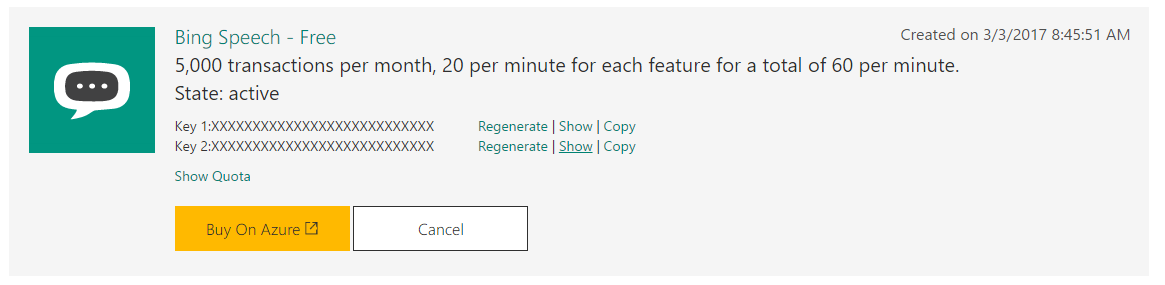
- 申請一個 free trial,請選擇: Bing Speech (5,000 transactions per month, 20 per minute for each feature for a total of 60 per minute.)
- 拿到如下圖的 Key1 與 Key2 就可以與 API 溝通
[重點項目]
- 參考支援的語系 是否有您需要的,例如:zh-TW, zh-HK 等
- Speech Recognition 提供了 Client Library (WPF, Android, iOS) 與 REST API,如果是寫 Server 的也有對應的 SDK
- 沒有 UWP
- REST API 與 Client Library 的差別
- REST API 回傳的内容衹會有一種識別結果,沒有部分的結果 (無法做到變說變分析)
- 利用 Client Library 可以 real-time streaming,代表用戶邊説就可以送到 Server 邊翻譯部分的文字回來。
- real-time streaming 支援:Android, iOS 與 Windows (not UWP)
- 支援在翻譯的内容帶回 speech intent,瞭解 intent 的對象,另外可以搭配 LUIS訓練 intent model 增加準確度
- REST API 參考Bing Speech Recognition API的説明
- Server Library
- 支援 real-time streaming 講 audio 翻譯成文字,但衹支援 Windows
本篇是使用 UWP App 作爲範例,在 Client Library 沒有支援下,改用 Bing Speech Recognition API (REST API) 的方式來進行。
使用 Bing Speech Recognition API 幾個重點:
- 先取得 Access Token: 利用註冊 Bing Speech API 時拿到的 Key1 或 Key2。
- Required Parameters: 裏面有些是固定參數要注意,例如:appID, locale(要有支援的才可以), version, scenarios(影響識別的效果)
- 官方文字有些是錯誤的,可以參考: Sample
[範例程式]
寫一個可以錄音的功能,讓用戶把説的話錄下,轉給 Bing Speech Recognition API 分析並轉換成文字。
1. 要存取用戶的麥克風要記得宣告:
<Capabilities>
  <Capability Name="internetClient" />
  <DeviceCapability Name="microphone" />
</Capabilities>
2. 利用 MediaCapture Class 截取用戶講的話,並且用 IRandomAccessStream 保存起來:
public async Task Initialization()
{
    if (capture != null)
    {
        return;
    }

    // 設定要錄製的 Audio
    MediaCaptureInitializationSettings settings = new MediaCaptureInitializationSettings
    {
        StreamingCaptureMode = StreamingCaptureMode.Audio
    };

    // 初始化 MediaCapture
    capture = new MediaCapture();
    await capture.InitializeAsync(settings);

    capture.RecordLimitationExceeded += Capture_RecordLimitationExceeded;
    capture.Failed += Capture_Failed;

    buffer = new InMemoryRandomAccessStream();
}

public async void StartRecord(object sender, RoutedEventArgs e)
{
    if (isRecording)
    {
        return;
    }

    // 開始錄音
    await capture.StartRecordToStreamAsync(MediaEncodingProfile.CreateWav(AudioEncodingQuality.Auto), buffer);

    isRecording = true;
    recordStartTime = DateTime.UtcNow;
    timer.Start();
}

public async void StopRecord(object sender, RoutedEventArgs e)
{
    timer.Stop();
    isRecording = false;

    // 停止錄音
    await capture.StopRecordAsync();

    // 轉成 IRandomAccessStream
    IRandomAccessStream audio = buffer.CloneStream();

    // 轉換成文字
    await TranslateAudioToString(audio);
}
3. 建立 Bing Speech API 使用前的 Authorization 機制,拿到交易用的 Access Token:
public class Authorization
{
    /// <summary/>
    /// Bing Speech API subscription key
    /// </summary/>
    private const string subscriptionKey = "{your subscription key}";

    /// <summary/>
    /// Authenticate Uri
    /// </summary/>
    const string Uri = "https://api.cognitive.microsoft.com/sts/v1.0";

    public static async Task GetAccessToken()
    {
        using (HttpClient client = new HttpClient())
        {
            string url = $"{Uri}/issueToken";

            client.DefaultRequestHeaders.Add("Ocp-Apim-Subscription-Key", subscriptionKey);

            // use PORT method, and content length is 0
            var result = await client.PostAsync(new Uri(url), null);

            return await result.Content.ReadAsStringAsync();
       }
   }
}
4. 建立一個 Service 將錄下來的聲音交給 Bing Speech Recognition API 轉換成文字:
public BingSpeechService(string lang)
{
    if (string.IsNullOrEmpty(lang) || SupportLangages.Contains(lang) == false)
    {
 throw new NotSupportedException("not support language");
    }

    // Always use appID = D4D52672-91D7-4C74-8AD8-42B1D98141A5.  (GUID)
    string appId = "D4D52672-91D7-4C74-8AD8-42B1D98141A5";

    // https://www.microsoft.com/cognitive-services/en-us/Speech-api/documentation/overview
    string locale = lang;

    // Windows OS, Windows Phone OS, XBOX, Android, iPhone OS
    string deviceOS = "Windows10";

    // A globally unique device identifier of the device making the request (GUID)
    string instanceid = "565D69FF-E928-4B7E-87DA-9A750B96D9E3";

    QueryString = $"scenarios=smd&appid={appId}&locale={locale}&device.os={deviceOS}&version=3.0&format=json&instanceid={instanceid}";
}

public async Task Initialization()
{
    AccessToken = await Authorization.GetAccessToken();
}

public async Task SendAudioToAPIAsync(IRandomAccessStream stream)
{
    string host = @"speech.platform.bing.com";
    string contentType = @"audio/wav; codec=""audio/pcm""; samplerate=16000";

    using (HttpClient client = new HttpClient())
    {
        // request id is (GUID)
        string uri = $"{RecognizeUri}?{QueryString}&requestid={Guid.NewGuid().ToString()}";

        client.DefaultRequestHeaders.Authorization = new Windows.Web.Http.Headers.HttpCredentialsHeaderValue("Bearer", AccessToken);
        client.DefaultRequestHeaders.Accept.Add(new Windows.Web.Http.Headers.HttpMediaTypeWithQualityHeaderValue("application/json"));
        client.DefaultRequestHeaders.Accept.Add(new Windows.Web.Http.Headers.HttpMediaTypeWithQualityHeaderValue("text/xml"));
        client.DefaultRequestHeaders.Host = new Windows.Networking.HostName(host);
        client.DefaultRequestHeaders.Add("ContentType", contentType);

        HttpStreamContent streamContent = new HttpStreamContent(stream);

        var response = await client.PostAsync(new Uri(uri), streamContent);

        var buffer = await response.Content.ReadAsBufferAsync();
        var byteArray = buffer.ToArray();
        var responseString = Encoding.UTF8.GetString(byteArray, 0, byteArray.Length);
        return responseString;
    }
}
與 API 溝通時要記得處理 Error Responses:
- Http/400 BadRequest: Will be returned if a required parameter is missing, empty or null, or if the value passed to either a required or optional parameter is invalid. The “Invalid” response includes passing a string value that is longer than the allowed length. A brief description of the problematic parameter will be included.
- Http/401 Unauthorized: Will be returned if the request is not authorized.
- Http/502 BadGateway: Will be returned when the service was unable to perform the recognition.
- Http/403 Forbidden: Will be returned when there are issues with your authentication or quota.
範例程式下載位置:AudioRecordSample。
======
Cortana 在開放的地區已經有很多的應用,雖然還沒有支援繁體中文,但是 LUIS 有支援還是有機會可以整合到自己的應用中。
再等待 Cortana 支援前,先用自己的方式整合吧。希望對大家有幫助,謝謝。
References:
- Microsoft Speech
- Universal Windows App Development with Cortana and the Speech SDK
- Cortana and Speech Platform In Depth
- Speech recognition (Use speech recognition to provide input, specify an action or command, and accomplish tasks.)
- Define custom recognition constraints (Learn how to define and use custom constraints for speech recognition.)
- Enable continuous dictation (Learn how to capture and recognize long-form, continuous dictation speech input.)
- 使用 MediaCapture 進行基本相片、視訊和音訊的擷取
- 使用 MediaCapture 處理裝置方向
- 適用於行動裝置的相機 UI 功能
- MediaCapture Class
- MediaCaptureInitializationSettings

沒有留言:
張貼留言